Your clinic open for bookings 24/7, from your own website.
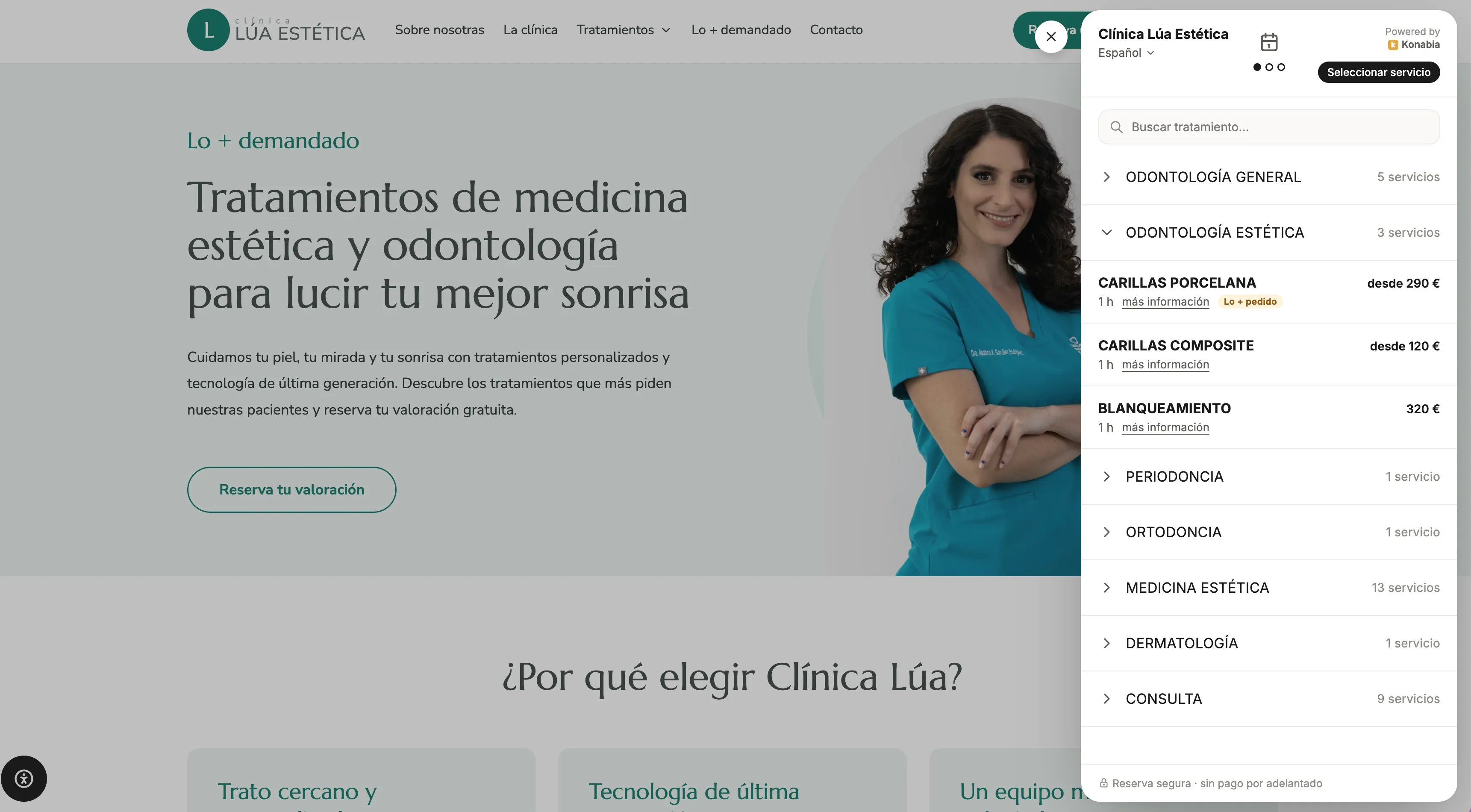
A button on your website opens the booking panel: the patient picks a treatment, day and time, and the appointment goes straight into your calendar. With WhatsApp confirmation and reminder.
Booking today
If people can only book by phone, they book somewhere else.
Only during front-desk hours
Many patients look for treatments at night or at the weekend, exactly when nobody answers.
Messages to ask for slots
«Do you have anything on Thursday?» Three back-and-forth messages for a single appointment.
Interested people go cold
If they can't book right then, they leave it for later. And later never comes.
How the patient books
Three steps and it's in your calendar.
-
1
Pick the treatment
Search or browse by category, with price, duration and more information for each service.
-
2
Pick a day and time
They only see slots that are really free in your calendar.
-
3
Enter details and confirm
The appointment goes into the calendar and they get a WhatsApp confirmation.
On your website, with your brand
A booking panel that feels part of your site.
It opens over your clinic's website, without sending the patient elsewhere, with your treatments organised the way you want.
Search and categories
Patients find their treatment by typing or browsing categories.
Price and duration
Each service shows its price (or «from») and how long it takes.
More information
An explanation of each treatment to answer questions before booking.
Highlight the most popular
Flag the treatments you want to appear first.
In several languages
The patient chooses the booking panel's language.
No upfront payment
Booking is quick and frictionless: no card needed.
All connected
The booking is only the beginning.
Goes into the calendar
With the right professional, service and duration.
CalendarConfirmation and reminder
Via WhatsApp, so they don't forget the appointment.
WhatsAppCreates or updates their profile
If they're new, their profile is ready; if not, it adds to their history.
Patient profileYou know where they came from
If they arrive from an ad or a campaign, the booking is attributed.
Analytics & UTMsFAQ
Questions about online booking
Which times does the patient see? +
Only the slots that are really free in your calendar, based on each professional's hours and existing bookings.
Do they have to pay to book? +
No. Patients book with no upfront payment.
What happens when someone books? +
The appointment goes straight into your calendar, the patient gets a WhatsApp confirmation and, before the visit, a reminder.
Is it available in several languages? +
Yes. The patient can choose the booking panel's language.
Can I highlight some treatments? +
Yes. You can organise your services by category and flag the most popular so they appear first.
Keep exploring
Related features
Calendar
Your whole team in one view, multiple locations, occupancy and packages on every appointment.
Learn moreShared inbox and automatic messages, via the official API on your own account.
Learn moreAnalytics & UTMs
Which ad, channel or campaign actually brings you bookings.
Learn moreInstagram lead capture
Instant replies to your ad leads and booking right inside WhatsApp.
Learn moreReady to make sure no patient goes without follow-up?
Ask for your follow-up audit: in one call we go through your schedule and your patient database with you.
- We look at what's slipping away: half-used packages, overdue check-ups and dormant patients
- We show you Konabia with your clinic's treatments
- If we're not a fit, we'll say so